
 KeyLen AI Help
Using KeyLen AI
KeyLen AI reads a PDF and hands back a structured analysis of it. This page takes you from choosing a document to reading the result — and covers what to do when something does not work.
What KeyLen AI does
KeyLen AI is an app for iPhone and iPad. You give it a PDF, and it returns a structured analysis of that document rather than another wall of text to read.
It is built for the documents people actually have to work through — product manuals, annual reports, technical papers and proposals.
There is no account to create. No sign-up, no sign-in.
Analyze a PDF
Choose Select PDF Document on the home screen, then pick a PDF. PDF is the only file type KeyLen AI reads.
The app extracts the document's text on your device. The original PDF file is never uploaded.
What is sent for analysis is the extracted text — not the file. It travels over an encrypted connection to the KeyLen AI service, which passes it to the AI provider that produces the analysis. Analysis needs a network connection.
When it finishes, the result is saved so you can open it again.
Quick Analysis and Deep Analysis
KeyLen AI has two modes.
Quick Analysis takes a document in one pass and returns the essentials. It is available on every plan, including the free one.
Deep Analysis applies a specialised method to a particular kind of document, and returns a longer, structured report. Which document types are available is shown on the home screen, and the list grows over time.
Deep Analysis is part of the trial and Pro. It is not included in the free tier.
Understand your result
Every analysis returns the same four parts:
- Summary — what the document says
- Insights — what matters in it
- Risks — where the problems are
- More — the rest of the report
Deep Analysis adds further sections specific to the document type.
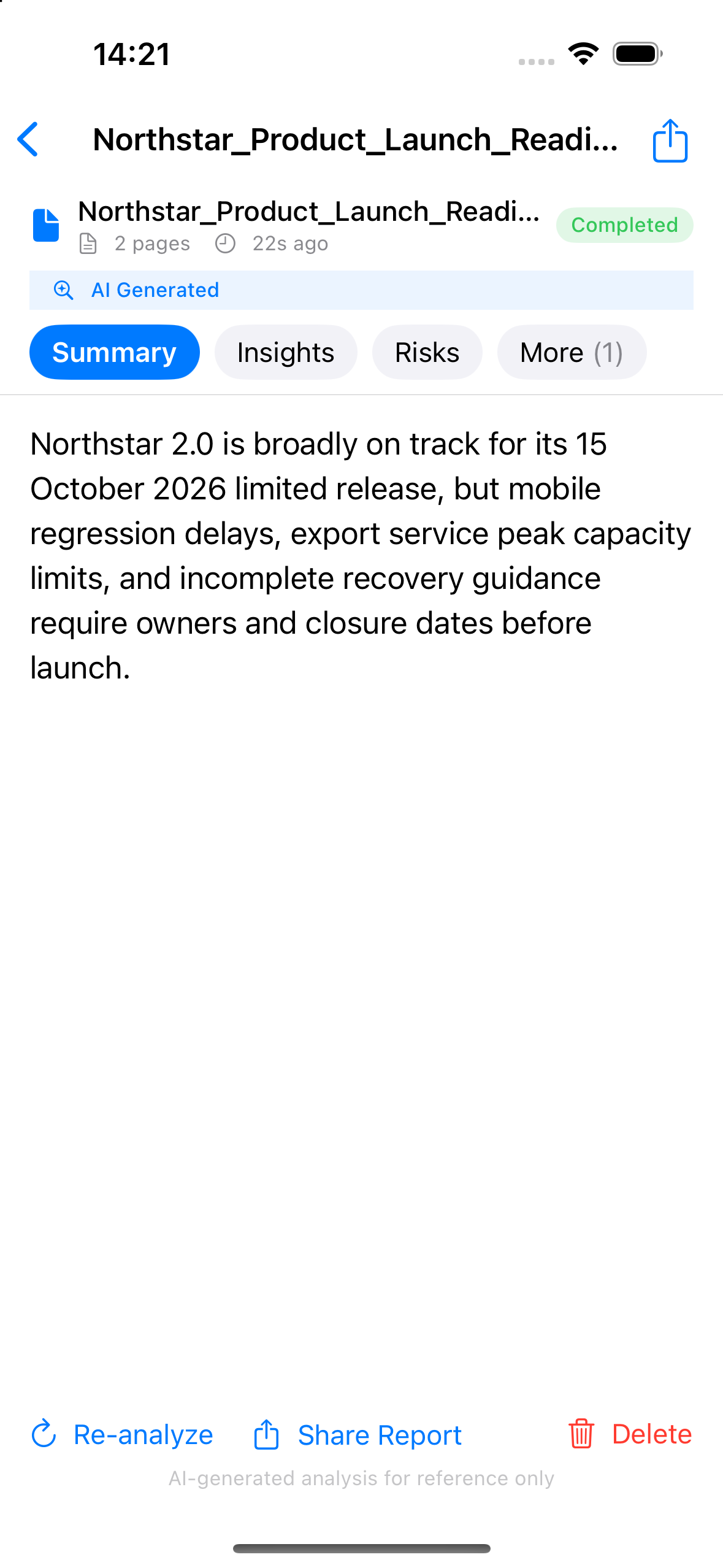
From an open result you can:
| Action | What it does |
|---|---|
| Re-analyze | Runs the analysis again on the same document |
| Share Report | Exports the result as Markdown and opens the share sheet |
| Delete | Removes this one result from the app |
Delete your data
Delete removes a single result, from that result's own screen.
To remove everything at once, open Settings → Delete My Data. That permanently deletes your document history, your analysis results and the usage data associated with them.
Deleting your data does not cancel your store subscription. If you have a subscription, a minimal record of ownership is kept so the purchase is not lost.
For the full detail, see Data Deletion.
Free, trial and Pro
The free tier includes Quick Analysis, with a daily allowance.
A 7-day trial is available for KeyLen AI. It adds Deep Analysis. When the trial ends, Quick Analysis remains available every day.
KeyLen AI Pro is available monthly or yearly and raises the allowance for both modes. Your remaining allowance is shown on the home screen.
On the iOS version, subscriptions are handled by the App Store. Manage or cancel them in iOS Settings → your Apple ID → Subscriptions. The terms that govern subscriptions are in the KeyLen AI Terms.
Restore Purchases (iOS) — if you reinstall the app or move to a new device, open Settings → Restore Purchases. Use the same Apple ID you bought with.
If something is not working
My analysis failed.
Check your connection and try again — analysis needs a network connection. Some failures come from the AI service being briefly unavailable, and waiting a moment usually clears them.
I keep seeing a message about identity.
Restart the app and try again.
It says my limit has been reached.
You have used the allowance for that mode. A Quick Analysis allowance resets each day; a Pro allowance resets each month. The home screen shows what is left.
Deep Analysis has stopped working.
Your trial may have ended. After it ends, Deep Analysis needs Pro. Quick Analysis keeps working.
Restore Purchases found nothing (iOS).
Check that you are signed in with the same Apple ID you used to buy, then try again.
It says product information is unavailable (iOS).
The App Store could not be reached. Check your connection and try again.
Privacy and support
The PDF stays on your device. KeyLen AI extracts its text there, and sends the text — not the file — for analysis. The extracted text is not stored on our servers.
Results are saved so you can reopen them. They are also stored by the KeyLen AI service, where they are deleted on a 90-day schedule. There is no account and no sign-in.
For the full detail, see the KeyLen AI Privacy notice.
If something is still not working after the section above, write to support@keylen.com.cn and tell us what you did and what you expected to see.
For privacy or data requests, write to privacy@keylen.com.cn.